

I built a full website — every single page — using ChatGPT. No human editing. No fluff. Just AI-generated content, published exactly as it came out. The result?
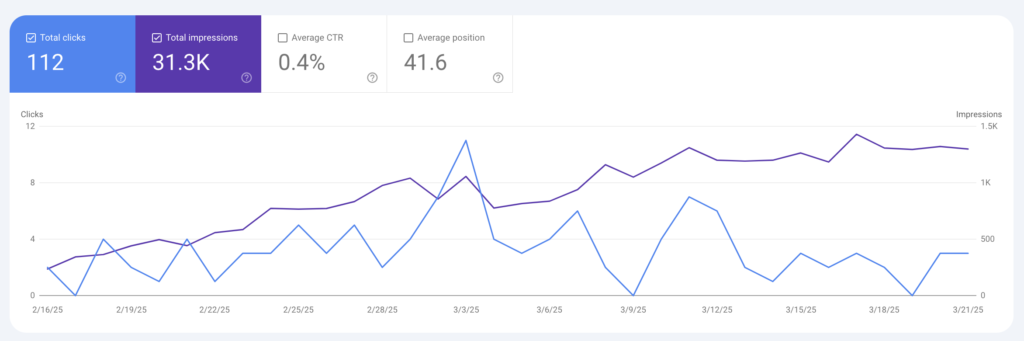
100% Indexing Ratio. Its just been 1 and half month and the site has already climbed up the rankings for relevant keywords, also Clicks and Impressions have spiked up.
This blog isn’t just about the results — it’s about how you can replicate this exact process. I’ll walk you through every step: from gathering inputs to training a custom GPT, creating frameworks, and generating content that gets indexed by Google — all without any “humanizing” of the AI content.
What You Need Before You Start
Let’s say you’re building a site for a service business — like Personal Injury Lawyer Services. Before you generate anything with AI, you need strong inputs. That’s where a detailed SEO Questionnaire comes in.
Make sure it includes:
- Business overview
- Vision & mission
- Goals
- Physical location(s)
- Service areas
- Complete list of services and sub-services
- Target audience
- Competitor references
- Keywords (optional, but helpful)
If your client hasn’t filled out a doc like this, you can still collect data:
- Website content
- Meeting recordings
- Sales call scripts
- Social media posts
- YouTube/podcast videos
Use tools like Otter.ai or Whisper to transcribe them. Then organize it into a PDF — this becomes your training file.
What to Include in Your Training PDF
Besides core business info, add:
- About Us section
- Case studies
- Customer reviews
- Blog titles and past content
- Awards or recognitions
- Unique phrases, taglines, or positioning statements
You’re not just feeding your bot content — you’re giving it context. The more real examples and tone cues you include, the better your results.
Build the Site Structure First
Plan your ideal website navigation:
Top-Level Navigation:
- Home
- Services (dropdown)
- Car Accident Injury Claims
- Slip and Fall Accidents
- Workplace Injury Cases
- Medical Malpractice, Dog Bites, Wrongful Death
- Service Areas (dropdown)
- City-based location pages
- About Us
- Our Story
- Team
- Blog / Resources
- FAQs
- Contact Us
- Book an Appointment
Create Frameworks for Each Page Type
Before generating, set up content frameworks for:
Service Pages
- H1: Service name
- Intro: pain points
- Benefits
- Process overview
- Related sub-services (linked)
- Real reviews
- CTA
Location Pages
- H1: [Service] in [City]
- Local relevance & experience
- Neighborhood keywords
- Local stats or testimonials
- CTA
Homepage
- Brand intro
- Services summary
- Areas served
- Why choose us
- Testimonials
- CTA
The structure mentioned above is just for starters. You can improvise and create a final structure and feed it to the bot via PDF that you are creating. Once you define your structure, move to the next step.
Train + Publish Your Custom GPT Bot
Upload your training PDF to a Custom GPT (ChatGPT Pro feature). Once it’s ready, open a new thread and start talking to it.
Your first prompt can be something like:
“You’re trained with our full business profile and frameworks. Write a service page for Car Accident Injury Claims. Use the defined framework and:
- Focus on solving customer pain points
- Include sub-services with internal links
- Start with a stat + source
- Mention years of experience, projects completed
- Add real customer reviews
- Prompt for a gallery
- Add blog recommendations
- Showcase awards and recognitions”
Repeat and Scale
Once you receive your first piece, repeat for:
- Sub-services
- Locations
- About page
- Blog content
- FAQs
You’ll be surprised at how your bot:
- Understands your navigation
- Applies contextual linking
- Pulls from internal data and external sources
- Writes in your tone, structure, and voice
Why All This Effort Upfront?
Because this eliminates the need for constant rewriting. One well-trained GPT thread can produce:
- Pages that follow EEAT guidelines
- Indexed content with zero “humanizing”
- SERP-worthy results
I created content for 40+ Main pages in 15-20 hours this way. Light proofreading. Minor prompt tweaking. But zero human editing or rewriting.
And yes, most of those pages are already indexed and ranking.
I’ll share the full case study soon. But for now, here’s a screenshot from Google Search Console that shows what this method can do.
It shows the data of couple of months.
Leave a Reply